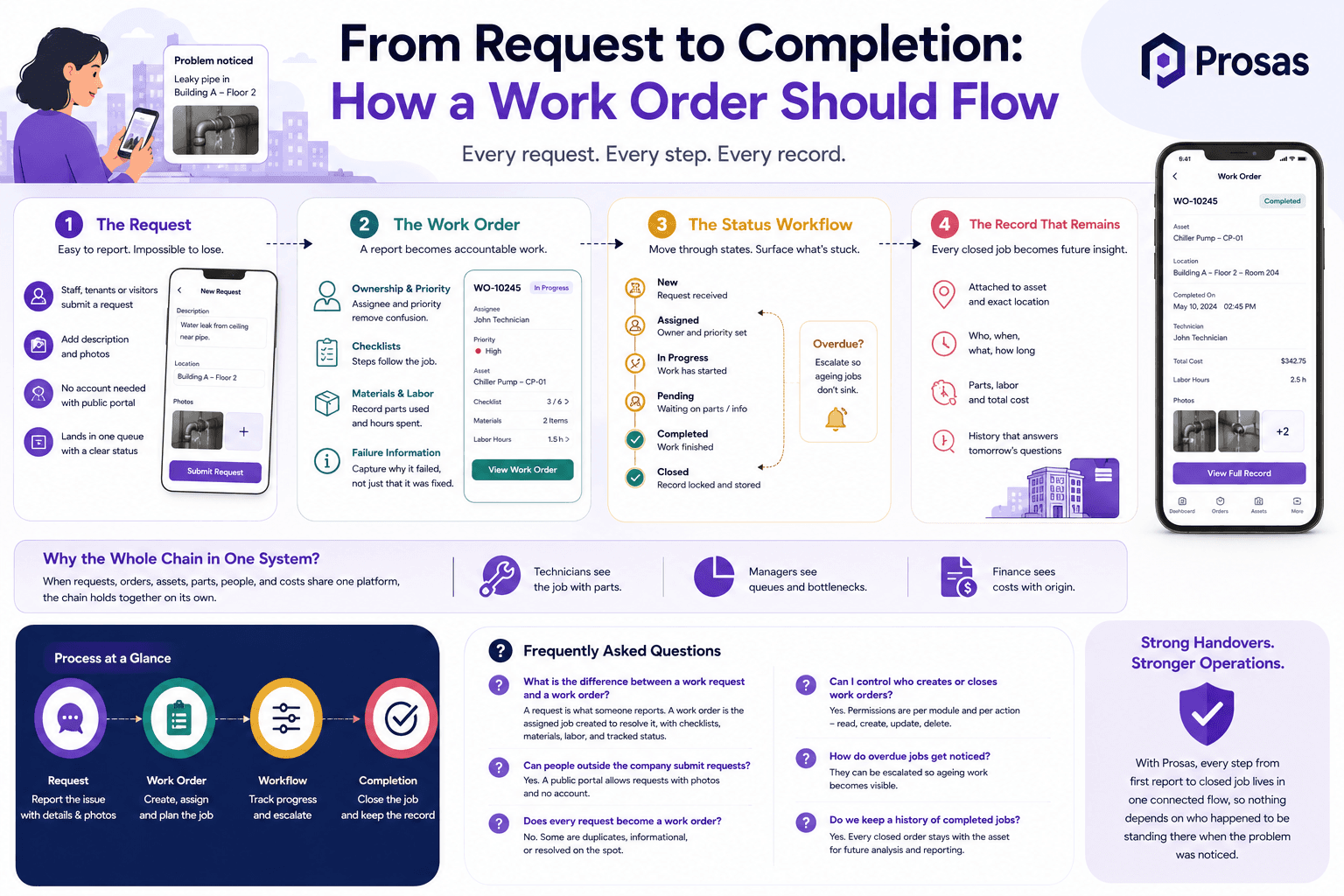
From Request to Completion: How a Work Order Should Flow
Ask any facility manager where jobs go missing, and the answer is almost never the repair itself. Work gets lost in the gaps — between the person who noticed the problem and the person who could fix it, between the verbal promise and the written job, between “it is done” and any proof that it was.
A good work order flow closes those gaps. Every report becomes a record, every record gets an owner, and every completed job leaves a trace behind it.
Prosas models that flow end to end, from the first report to the closed job and its cost.
Where the Process Usually Breaks
Most teams do not have a broken repair process. They have a broken intake process. The symptoms are familiar:
- Reports arriving by phone call, corridor conversation, or a message to whoever was nearby
- Two technicians sent to the same fault, and none to the one nobody logged
- No agreed priority, so everything is urgent and nothing is
- Jobs that are “finished” but nobody recorded what was replaced
- Month-end reports assembled from memory
If a request only exists in someone's head, it is not a request — it is a risk.
Step 1 — The Request
A work request is what someone reports. It should be effortless to raise and impossible to lose.
In Prosas, staff, tenants, and even visitors through a public portal can submit a request with a description and photos, without needing an account. It lands in a single queue with a status, so the person who reported it is not left wondering whether anyone saw it.
Photos matter more than people expect. A picture at intake often decides which trade to send, which part to bring, and whether the job is urgent — before anyone travels to site.
Step 2 — The Work Order
A work order is the job created to resolve the request. This is where a report becomes accountable work.
Ownership and Priority
Every order carries an assignee and a priority. Two fields, but they end most of the confusion — there is always an answer to “who has this, and does it come before the other one?”
Checklists
For anything repeatable, the steps ride along with the job. A checklist turns experience that lives in one veteran technician's head into a procedure anyone on the team can follow.
Materials and Labor
Parts consumed and hours spent are recorded on the order itself. That is what makes cost reporting possible later without a reconstruction exercise.
Failure Information
Recording why something failed — not just that it was fixed — is what eventually turns a pile of repairs into a pattern you can act on.
Step 3 — The Status Workflow
A work order is not a checkbox. It moves through defined states, and each move is a deliberate transition rather than a silent edit. Orders that pass their due date can be escalated, so the ageing job surfaces instead of sinking.
This is the difference between a list and a workflow: a list tells you what exists, a workflow tells you what is stuck.
Step 4 — The Record That Remains
When the job closes, the value does not end. The completed order stays attached to the asset and to its exact location — facility, building, floor, room — along with who created it, who last touched it, what it consumed, and how long it took.
Six months later, that record answers questions that used to require guesswork:
- How many times has this unit failed this year?
- Which location generates the most reactive work?
- What did we actually spend on this asset?
- Which jobs keep going overdue, and why?
Why the Whole Chain Has to Live in One System
Each step above can be done in a separate tool. The moment they are, the links between them become manual — and manual links are the ones that break under pressure.
When requests, orders, assets, parts, people, and costs share one platform, the chain holds together on its own. A technician sees the job with its parts. A manager sees the queue with its bottlenecks. Finance sees the cost with its origin.
Frequently Asked Questions
What is the difference between a work request and a work order?
A request is what someone reports. A work order is the assigned, scheduled job created to resolve it, with checklists, materials, labor, and a tracked status.
Can people outside the company submit requests?
Yes. A public portal allows requests with photos and no account, which is useful for tenants, visitors, and contractors.
Does every request become a work order?
No, and it should not. Screening at intake is part of the process — some requests are duplicates, some are informational, and some are resolved on the spot.
Can I control who creates or closes work orders?
Yes. Permissions are per module and per action, so reading, creating, updating, and deleting are all granted separately.
How do overdue jobs get noticed?
They can be escalated rather than left in the queue, so ageing work becomes visible instead of quietly accumulating.
A Process Is Only as Strong as Its Handovers
Most maintenance failures are not technical. They are handover failures — a report that never became a job, a job that never named an owner, a repair that never left a record.
With Prosas, every step from first report to closed job lives in one connected flow, so nothing depends on who happened to be standing there when the problem was noticed.